nvda · Releases
nvda releases
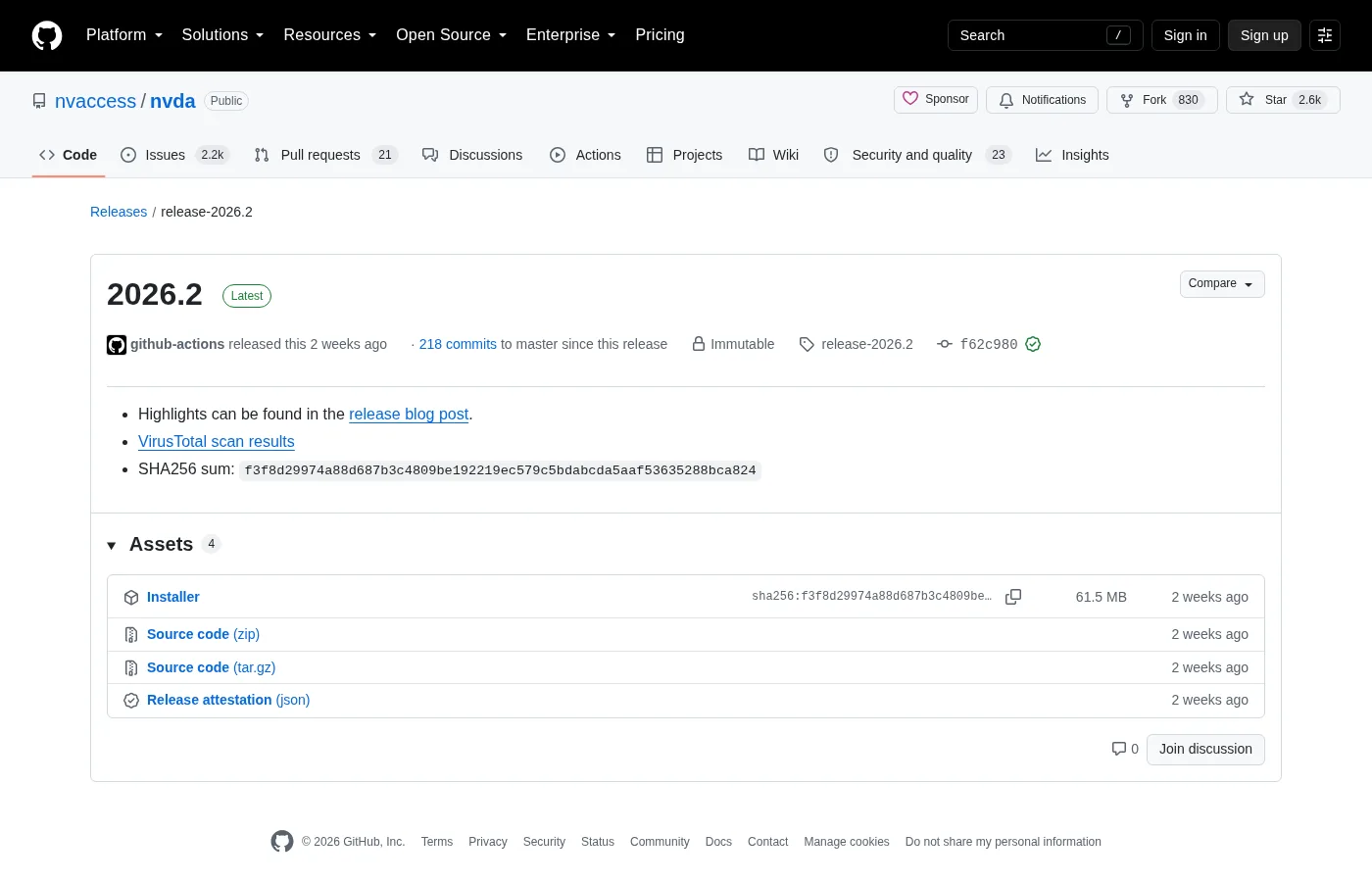
For Windows nvda installs, take nvda_*.exe from a release-* tag on nvaccess/nvda. That filename is the primary asset Braille Quill pages maps, including nvda_2026.2.exe on release-2026.2.
Which file to download
Stable desktop builds use tags that start with release-. The Windows installer follows the pattern nvda_VERSION.exe. Beta and RC tags exist for testers; everyday desks should stay on a release tag unless you deliberately track beta.
| Pattern | Role | Who should take it |
|---|---|---|
nvda_*.exe | Windows installer | Default for Braille Quill pages |
| Beta / RC assets | Pre-release | Testers only |
| Source archives | Development | Contributors building from source |
How to verify authenticity
Prefer links that begin with github.com/nvaccess/nvda or download.nvaccess.org / nvaccess.org. Check that the asset name matches nvda_ plus a dotted version plus .exe. Winget id NVAccess.NVDA pulls from the same product line when the catalog is current.
SmartScreen may warn on a freshly downloaded exe. That warning alone is not proof of malware and not proof of safety. Return to the official URL if the filename looks altered.
Release cadence
NV Access publishes numbered release tags on GitHub. Braille Quill keeps the newest three release-* tags in gh.json for the file list below. Re-check the live Releases page before imaging a lab so the filename on the ticket still exists.
Winget versus the exe
Winget may lag the newest GitHub tag by days or weeks. If you need the exact exe named on release-2026.2, download nvda_2026.2.exe directly. If you prefer catalog installs, run winget and accept the version the manifest currently carries.
Related: winget guide, Windows install, download safely.
Portable copy notes
The same exe can offer an installed copy or a portable copy depending on the installer choices. Portable copies help USB workflows; installed copies help Start-menu discovery. Record which choice you made on the machine ticket so the next update is not a guess for the Windows desk.
Live release list
Sizes and download counts below come from GitHub at build time. Use them to confirm you grabbed the intended Windows installer for the screen reader.
Official releases
All releases on GitHub- GitHub stars
- 2,636
- Downloads, last 3 releases
- 1.6k
- Latest version
- 2026.2
- nvda_2026.2.exe 61.5 MB 302 downloads
2026.1.1
release-2026.1.1
- nvda_2026.1.1.exe 60.0 MB 1k downloads
2026.1
release-2026.1
- nvda_2026.1.exe 60.0 MB 295 downloads
Counts come from the GitHub API at build time and only cover the release-* tags shown here. Package managers (winget, Homebrew, Snap, Flathub) and app stores are not included.
Naming habits for tickets
Write the full asset name on the machine ticket, including the version digits. Saying only “the screen reader installer” is how two technicians download different tags in the same week. Prefer nvda_2026.2.exe style names when that is the live asset, and update the ticket when Releases moves forward.
If winget is also allowed, write NVAccess.NVDA on the same line. The two doors should stay visible so a blocked catalog does not trigger a scramble through search ads for the Windows desk.
School images benefit from a shared note that lists the last known good tag. When GitHub is rate-limited during a mass imaging day, that note prevents improvisation with random mirrors.
Checksums and signatures
When upstream publishes additional verification files beside the exe, prefer those files from the same tag rather than third-party mirror checksums. If only the exe is present, rely on the official host, publisher metadata, and a proven speech test after install.
Do not trust a forum post that pastes a hash without linking the matching Releases asset. Hashes without an official URL are easy to swap. Keep the browser history entry that shows github.com/nvaccess/nvda for audits of the screen reader download.
Documentation habits
Keep a short plain-text note beside the installer door: OS version, nvda tag or winget id, and whether the copy is installed or portable. That note survives staff turnover better than chat lore. When speech misbehaves after a Windows cumulative update, the note tells you whether to repair nvda or roll back the OS change first.
Students and volunteers can follow the same note format. Consistency matters more than perfect prose. A boring checklist beats a clever paragraph that nobody re-reads during an outage of the screen reader path.
If you publish internal wiki pages, link back to GitHub Releases and nvaccess.org rather than hosting a private mirror of the exe. Mirrors drift. Official doors get security fixes first.
Operational notes for busy weeks
Imaging weeks fail when two technicians use different download doors. Agree on GitHub Releases or winget before the first machine is touched. Put the choice in the shared checklist rather than a chat thread that scrolls away.
Speech complaints often trace back to muted mixers, HDMI audio on a dark display, or Narrator still running. Check those three items before you reinstall the screen reader. Reinstalls without diagnosis waste the afternoon.
Keep headphones labelled for training rooms. Shared earpads get lost. A simple bin with spare cables prevents cancelled accessibility demos when hardware goes missing five minutes before class.
After cumulative Windows updates, re-prove a short reading task on the golden image. Feature updates can change audio defaults. A five-minute check is cheaper than a Monday morning pile of tickets.
Document braille display inventory with serial numbers when your organisation owns the hardware. Software settings alone cannot fix a failing cell. Separate hardware tickets from software tickets so the right person responds first.